
Many Shopify stores list each colour or print as its own product. It keeps inventory and photos simple, but it hides choice: a shopper looking at the black t-shirt never learns it also comes in olive, cream and navy. Colorlink is our Shopify app that brings those options together as swatches on every product page.
The problem it solves
If shoppers can’t see the other colours, they leave when the one in front of them isn’t quite right. Plain dropdown menus aren’t much better: names like “Moss” or “Ivory” don’t show what the colour actually looks like.
How Colorlink works
- Group separate products: link the products that are colours or prints of the same item, and Colorlink shows them as swatches on each product page in the group. Shoppers tap a swatch to open that colour.
- Works with variants too: for a product with its own colour variants, the swatches switch the variant instantly, without reloading the page.
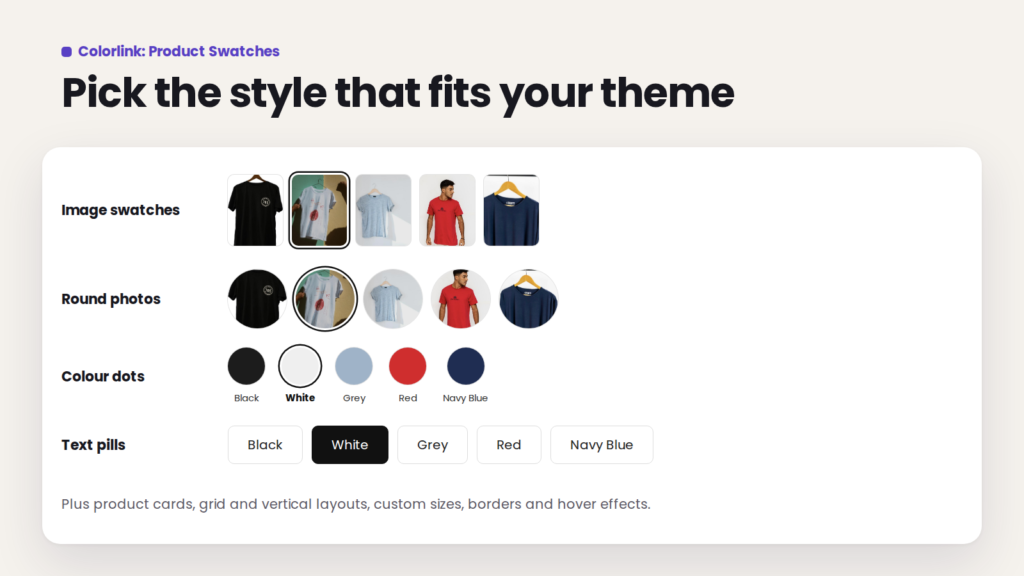
- Four swatch styles: image swatches, colour dots, text pills or product cards with price.
- Badges and stock: show New and Sale badges, and fade or hide sold-out swatches.
- Your design: set swatch size, shape, border and hover effect separately for desktop and mobile.
- No code: add the block in the Shopify theme editor.
How it helps different stores
- Clothing and ethnic wear: show every print of a kurta or every shade of a tee in one row.
- Footwear and bags: show each colourway as an image, so shoppers see exactly what they’ll get.
- Home and decor: show fabrics and finishes side by side.
- Stores with large catalogues: keep separate products for each colour, without hiding the range.
Setting it up in four steps
- Install Colorlink from the Shopify App Store.
- Create a group and add the products that are colours of the same item.
- Add the Colorlink block to your product page in the theme editor.
- Pick a swatch style and adjust size, shape and hover effect to match your theme.
Tips for better swatches
- Use image swatches for prints and textures, and colour dots for plain colours.
- Give colours clear names shoppers understand.
- Fade sold-out colours rather than hiding them, so shoppers know the option exists.
- Check the swatches on your phone, where most shoppers will see them.
Pricing
Colorlink has a free plan with all four swatch styles, custom sizes and effects, badges and up to three product groups. The Pro plan adds unlimited groups plus grid and vertical layouts, with a 7-day free trial. See the current plans on the App Store listing.
Questions
Can Colorlink link separate products as colour swatches?
Yes. Group the products that are colours or prints of the same item, and each product page shows the others as swatches.
Does it work with normal colour variants?
Yes. For a product’s own variants, the swatches switch the variant instantly without reloading the page.
Do I need to edit theme code?
No. Add the Colorlink block in the Shopify theme editor.
Is Colorlink free?
There’s a free plan for up to three product groups. Pro adds unlimited groups and more layouts.
Leave a comment